

The Instagram media kit, 2026 edition (what to put on it, and where each number comes from)


The Junibloom team
Building the growth OS for growing creators
A 2026 media kit is one page and it is mostly numbers: reach, engagement rate calculated on reach, a per-format breakdown, audience demographics, and a rate per deliverable. A brand manager has to answer two questions from it, "will this reach my buyer" and "what does it cost", and your design barely moves either one. Search for a template and you will get a hundred Canva files carrying a headshot, a follower count and a pastel gradient. That is the easy part, and it is not the part that loses you deals.
The short version:
- Seven blocks, one page: positioning line, headline metrics, per-format performance, audience, proof, rates, contact.
- Calculate engagement on reach, not followers, and say which denominator you used. A kit that does not say is a kit a brand cannot check.
- Do not put a niche average next to it. No published benchmark for engagement on reach exists at any follower size, so there is nothing to compare against except your own history.
- Put a rate on it. "Rates available on request" reads as undecided and invites a low opening offer.
- Price the rate from the median reach of one reel, not your monthly reach total and not your follower count.
- A PDF is stale the day after you export it. That is the one problem a template cannot solve.
Here is what belongs on it, plus the part the template posts skip: exactly where each number comes from.
The seven blocks, top to bottom
- Who you are, in one line. Not a bio. A positioning line: niche, audience, and what you make. "Home-cooking Reels for South Indian working parents" beats "content creator & storyteller ✨" every single time.
- The headline metrics. Followers, monthly reach, engagement rate, average Reel views. Four numbers, big type.
- Per-format performance. Reels, Carousels, Stories, each on its own line. This is the block most kits are missing.
- Audience. Age bands, gender split, top 3–5 cities or countries.
- Proof. Two or three past collaborations with a result attached, even if unpaid.
- Rates. Per deliverable, with usage rights stated.
- Contact. An email a human answers.
That's it. If it doesn't fit on one screen, it's a portfolio, not a media kit.
Where each number actually comes from
This is the bit that turns a template into a real kit.
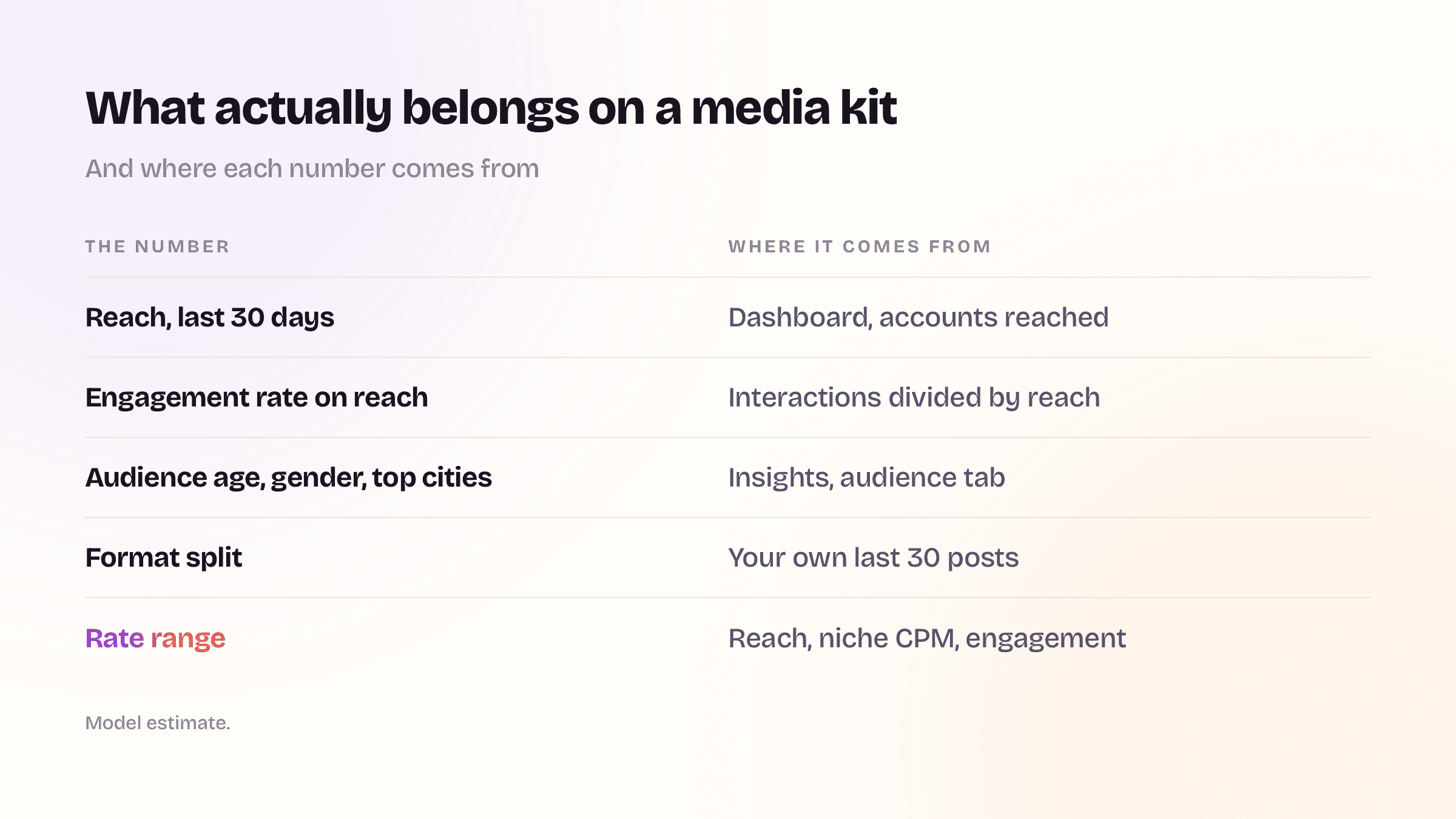
Reach (last 30 days). Instagram app → Professional dashboard → Accounts reached. Use a clean 30-day window, not "last 7 days" (too noisy) and not lifetime (meaningless). Reach is unique accounts, which is what a brand's media planner is buying.
Engagement rate. Divide by reach, not followers:
(likes + comments + saves + shares) ÷ reach
Then resist the urge to put a niche average beside it. There is no published benchmark for engagement on reach, at any follower size, because reach is private data and no outside tool can measure it. Every public benchmark you can find divides by followers instead, which produces a much smaller number from identical engagement. Socialinsider puts Instagram at 0.48% for 2025 across 35M posts from 447,613 pages; Rival IQ's 2026 report puts the median at 0.30%. Both are follower-based. Neither is a band your reach-based figure can be checked against, and we walked through why every benchmark you find disagrees separately.
So what makes a naked percentage mean something to a brand manager reviewing forty kits? Not a comparison to strangers. Write the denominator next to the number ("4.8%, interactions divided by accounts reached") and, if you have the history, your own trend. A figure whose sum is stated is checkable. A figure sitting next to an invented industry average is not.
Saves and shares belong inside that formula. They're the signals that tell Instagram to keep distributing a post, and a kit that ignores them undersells the creator whose content people actually keep.
Per-format numbers. Pull average views, saves, and shares separately for Reels, Carousels, and Stories over the same 30 days. A brand buying a Reel does not care about your blended average diluted by static posts. A brand buying a Story link swipe cares about exactly one pair of numbers, Story reach and link taps, and most kits don't have it.
Audience demographics. Professional dashboard → Total followers → the breakdown by age, gender, and top locations. Round to whole percentages. Nobody needs 34.7%.
Rates. Build them from reach, and from the right reach. A brand buying one Reel is buying the audience that reel will reach, so the input is the median reach of your recent Reels, not your monthly reach total and not your follower count. Those three numbers can be ten times apart on one account. Multiply that median by a rate per 1,000 reached, then check the result against the published tier medians: 1,200 creators surveyed in June 2026 reported median Reel asking rates of $250 between 2,500 and 25,000 followers, $750 between 25,000 and 60,000, $1,800 between 60,000 and 250,000, and $4,000 above that. State the usage terms beside the number. We wrote the full method, including why per-follower rules underpay, in what to charge for an Instagram Reel.
A sample one-pager
Sample data, an illustrative 25k fitness creator, not a real account:
| Block | What's on the kit |
|---|---|
| Positioning | Strength training for women returning after a break |
| Followers | 24,800 |
| Reach (30d) | 212,000 accounts |
| Engagement | 4.8% (interactions ÷ accounts reached) |
| Reels | avg 41k views · 980 saves · 610 shares |
| Carousels | avg 9k reach · 1,400 saves |
| Stories | avg 6.2k reach · 3.1% link tap rate |
| Audience | 71% women · 25–34 dominant · Bengaluru, Hyderabad, Pune |
| Proof | Two brands, with the result each one got |
| Reels (median reach) | 18,400 accounts, the number the rate is built on |
| Rates | Reel $368 · Carousel $313 · Story set (3 frames) $129 · paid usage quoted separately |
Notice how little of that is design. A brand manager reads that table and knows whether to reply.
Three things that quietly kill a kit
It's a PDF, so it's already stale. You exported it in March with March's numbers. It's July. Every brand you send it to is reading numbers you can no longer stand behind, and if your account grew, you're pitching yourself at a discount. There is a second half to this problem: Instagram's free insights only show 90 days of account history, so the six-month trend you would most like to show a brand slides out of view unless something recorded it at the time. A link that is current on the day it is opened solves both.
The engagement rate is calculated on followers. It inflates small accounts and punishes big ones, brands know the trick, and it makes the rest of your kit look less trustworthy than it is. Use reach.
There's no rate on it. "Rates available on request" reads as "I haven't decided" and invites the brand to open low. Transparent pricing upfront is closer to the norm now than the exception, a number with a reason attached is far harder to negotiate down than a blank space.
Yes, you can build this free today
Canva, Notion, Google Docs, any of them will produce a perfectly good one-pager, and a good kit built by hand beats a bad one built by a tool. Pull the numbers manually, put them in the seven blocks above, export it, and go pitch. That's a real afternoon's work and it will land you deals.
The catch is the second month. And the third. Instagram's free insights show you a rolling recent window, so the history you'd want to show a brand, "here's my last six months, trending up", slides out of view unless something is writing it down. Rebuilding the kit by hand every month is the kind of chore that gets skipped, and then you're back to sending March's numbers in July.
❓ Questions people actually ask
What should be on an Instagram media kit? The seven blocks above: a positioning line, headline metrics, per-format performance, audience demographics, proof, rates per deliverable, and a contact address. One page. If it does not fit on one screen it is a portfolio.
How many followers do I need before I make a media kit? None in particular. The kit exists to present reach and fit, and both of those are meaningful well before any follower milestone. A 4,000-follower account with a tightly defined audience and a stated rate is easier for a brand to buy than a 40,000-follower account with neither. Instagram's own creator portfolio is a different thing: it needs Creator Marketplace membership, which starts at 1,000 followers, and it shows your work but none of your numbers. What a brand can see there, and what it cannot, is worth knowing before you decide what your kit has to carry.
How do I make a media kit with no paid collaborations yet? Use the proof block for unpaid work, organic posts about products you already use, or a single case study of your own best-performing post with the numbers attached. What a brand is checking is whether you can produce a result and describe it, not whether somebody else paid you first.
What engagement rate should I put on my media kit? Yours, with the denominator written next to it. Divide interactions by accounts reached, say so on the kit, and do not place an industry average beside it, because no published benchmark for engagement on reach exists at any account size.
Should I include my rates, or wait for the brand to open? Include them. "Rates available on request" reads as undecided and invites a low first offer. In the survey behind the tier medians above, 70% of creators said they always or often receive offers below their standard rates, which is an argument for naming the number first.
Is a PDF media kit still acceptable in 2026? It works, and it goes out of date the day after you export it. If you send one, put the export date on it so the reader knows what window they are looking at, and re-export before every pitch round.
Where we come in
That specific chore is what Junibloom exists for. It reads your real numbers through Instagram's official API, never your password, never scraping, keeps a daily snapshot so your history keeps growing past the 90 days Instagram shows you, and renders a live media kit page at your own link. Per-format breakdowns, audience, and a fair-rate band per deliverable, with the figures that are our arithmetic labelled Estimate and your rates kept private: the public page never shows a price.
The version you send in December shows December's numbers, because you didn't have to do anything.
Build yours by hand this week. The seven blocks above are the whole recipe.