

Should I send a brand my media kit as a PDF or a link?


The Junibloom team
Building the growth OS for growing creators
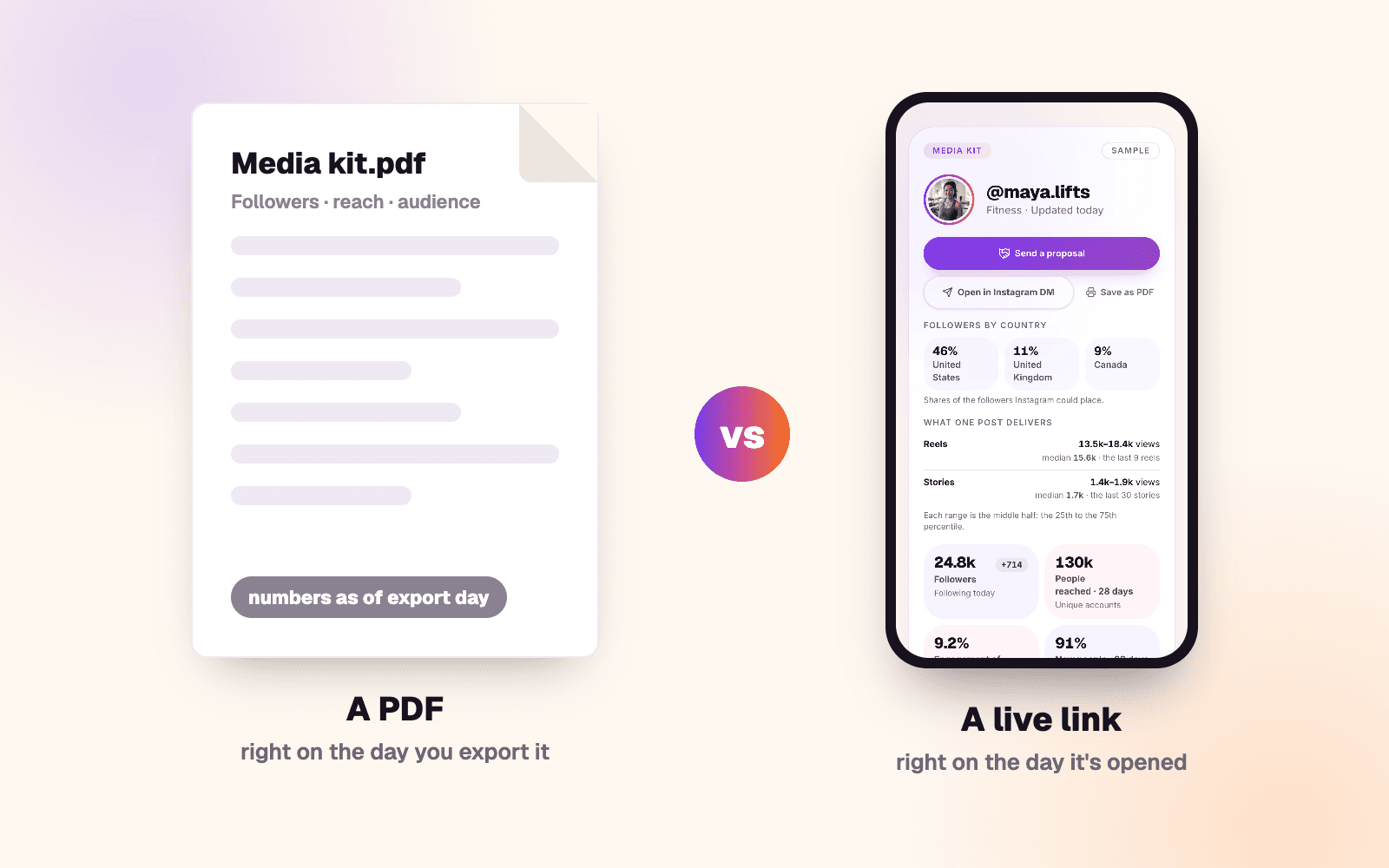
Send the link if you pitch brands regularly, and a PDF when a brand asks for a file or you're pitching once. The real difference is the date on your numbers. A PDF is right on the day you export it. A live link is right on the day a brand opens it, as long as the tool behind it keeps refreshing. Instagram makes a version of each, with a catch: its creator portfolio is a link that, by Instagram's own description, carries no reach or audience numbers, and the PDF from its Edits app is fixed the day you save it.
The short version:
- Pitching regularly? Send a link. It works in every email and DM, the numbers move without you, and you can change it after sending.
- Pitching once, or asked for a file? Send a PDF. Make it fresh, and date every number.
- Or do both. The link goes in the pitch, a dated PDF to anyone who wants an attachment.
- If you're in Creator Marketplace, brands can check your numbers. Meta's Creator Marketing Hub shows them your reach and engaged accounts for the last 30 days, ads included. A PDF from two months ago may not match.
PDF or live link, side by side 📊
A live link here means a page a tool builds from your Instagram account. A PDF shared as a link is still a PDF: the numbers inside are as old as the file.
| What matters | A PDF kit | A live link |
|---|---|---|
| Your numbers | Right on the day you export it | Right when it's opened, if the tool keeps refreshing |
| Where they come from | Typed or pasted in by you | Read from your account by the tool |
| Effort per pitch | Update the numbers, export again | None once it's set up |
| Effort to start | Design it, any way you like | Connect a professional account, arrange the page |
| Cost | Free if you make it yourself | Whatever the tool charges |
| Without internet | Opens once it's downloaded | Needs a connection |
| After you send it | Fixed, and you can't take it back | You can change it, or take it down |
| Whether it was opened | An attachment can't tell you | The tool can, if it counts opens |
| Your rate | Yours to include | Up to the tool |
| The look | Entirely yours | The tool's layout, and any mark it adds |
When a PDF is the better choice 📄
- The brand asked for one, or its form only takes an upload.
- You're pitching once, so a tool isn't worth setting up.
- The look is part of the pitch. Every font, photo and margin is yours.
- You want your rate in the document, with the deliverable and the usage terms beside it.
It also opens offline and outlives whatever app you made it in.
The cost is upkeep. A PDF ages from the day you export it, so before every send, pull fresh numbers from your Professional dashboard, make it again, and date each figure with its window. An undated figure reads as stale or cherry-picked, and because you typed the numbers, a brand has to take them on trust.
Instagram's Edits app can make one for you. Instagram says you can "export your video insights as a PDF to share directly with brands and partners", from the app's Audience section: where your followers are, what they're interested in and when they're most active.
When a live link is the better choice 🔗
- One address in every email, DM and bio.
- No re-exporting. A brand that opens it next month sees next month's numbers.
- Control after sending. Change it or take it down. A sent PDF is out of your hands.
- Numbers a brand doesn't have to take on trust, if the tool reads them from Instagram's official API and nobody can type over them.
- Knowing whether it was opened, if the tool counts opens, before you follow up.
What it costs you:
- The tool and its price. The link lasts as long as your account with it.
- A professional Instagram account, the kind Instagram gives insights to. Switching is free, but Instagram's help page notes: "If your personal account is private, switching to a professional account will make it public."
- Less design freedom. You arrange what the tool offers.
- A public page. Anyone with the link can open it, and it can turn up in search.
What a brand can check for itself 🔍
If you've joined Instagram's Creator Marketplace (a public professional account, 18 or older, at least 1,000 followers), a brand doesn't have to take your kit's word for it. Meta's help page for brands says its Creator Marketing Hub shows your total followers, your "Accounts Reached" and your "Accounts Engaged", each counted "in the last 30 days" and each including ads.
That's the case for current numbers in either format. A PDF made two months ago can disagree with Meta's last 30 days, even if every figure was true when you made it, and a brand can't tell age from padding. So use Meta's window, date it, and say whether boosted posts are in your numbers. What else brands check in a media kit has the rest.
The same membership unlocks Instagram's free creator portfolio, which you can share "with a link or directly in a message". It holds text about you, posts and Reels you pick, profiles of brands you've worked with, and badges for your responsiveness and partnership ads experience. Its help page lists no reach, audience or engagement numbers, so those are still yours to bring.
❓ Questions people actually ask
Should my media kit be a PDF or a link? A link if you pitch regularly, a PDF if a brand asks for a file or you're pitching once. More than the format, a brand needs numbers that are recent and dated.
Do brands prefer a PDF or a link? We looked for a brand or agency survey that asks, and found none. The confident answers we found came from companies that sell media kit tools, us included. Send what the brand asks for. If it doesn't say, a link in the email and a PDF on request covers both.
Can I make a media kit for free? Yes. Design a PDF yourself, or share Instagram's creator portfolio once you're in Creator Marketplace. The catch: the portfolio lists no reach or audience numbers, and a PDF is fixed the day you make it.
Can I see if a brand opened my media kit? Not from an attachment. A live kit can, if its tool counts opens, and a separate link per brand tells you which pitch was opened.
Should my rates go on my media kit? In a PDF, yes: a range, with the deliverable and the usage terms beside it. On a public link, anyone with the address can read it. Some live kits leave prices off the public page and let you quote each brand directly. Here's how to work out what to charge for a Reel.
Skip the re-export
If making the PDF again before every pitch is the part you'd skip, Junibloom's live media kit does that job: one public page, junibloom.com/kit/ plus your username, built from Instagram's official numbers and refreshed through the day. It shows when it's opened and where from, never who opened it. The catches, plainly: it needs a professional account, connected through Instagram's own login; it only reads your account, and you can disconnect any time; your rates never appear on the public page; and every kit carries a small "Made with Junibloom" mark. If you stop paying, the page says your kit is paused, and the same link works again when you turn it back on. You can still save it as a PDF. It's 7 days free, then $19.99/mo.